Foodnance is food cost software for independent restaurants, bakeries and commissaries in Canada.
Photograph a supplier invoice. Foodnance reads every line, updates the cost of every recipe that uses those ingredients, and tells you which vendor just raised prices, before it quietly eats your margin.
Early access: we set your account up with you, one business at a time.
No signup for the calculator. See your dish cost in under a minute.
Already a customer? Log in
Questions? We are here to help. Email us hello@foodnance.com
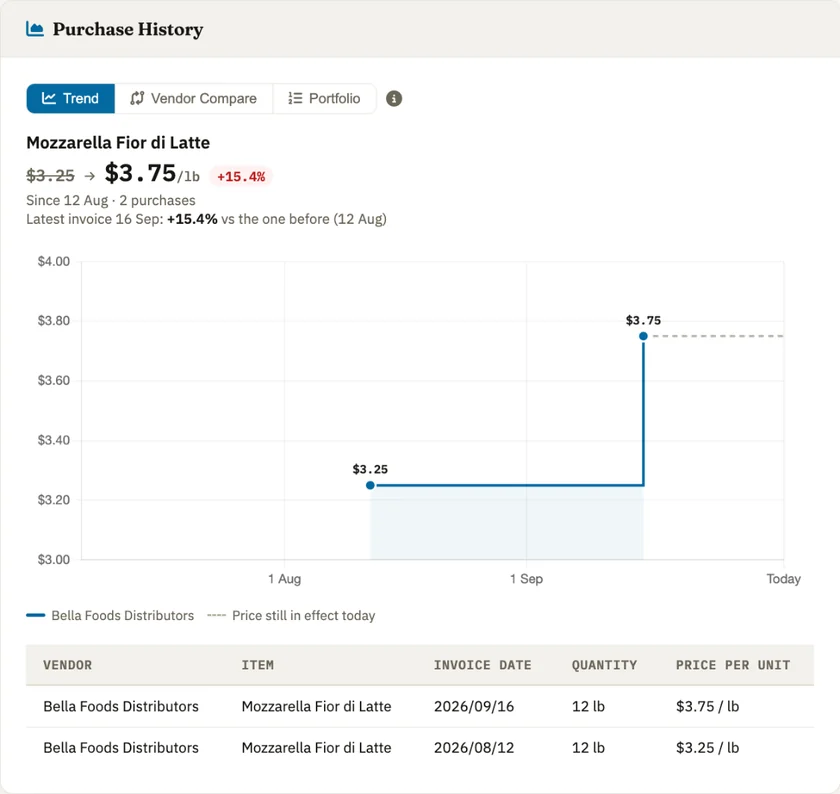
Most tools stop at bookkeeping. Foodnance carries the number all the way through to what a plate actually costs you.
Photo or PDF in, itemised lines out: product, pack size, unit price. It flags a total that doesn't add up, so a typo never becomes a wrong food cost.
See exactly which items went up, by how much, and which supplier is cheapest for the same item, with the dollar figure you'd save by switching.
Cost every recipe from live ingredient prices, then build finished products from recipes. When flour goes up, every affected margin updates itself.
Count by storage area in walk order, on a phone, offline if the walk-in has no signal. See counted versus expected, and what the variance cost you.
Monthly profit and loss from real purchases, with the option to swap in stock-take-based true cost of goods instead of purchases alone.
Track food-safety certificates per staff member and get told what's expiring before an inspector is the one who notices.
The only recurring work is the part you already do: receiving invoices.
Photograph it on your phone as it arrives, or upload the PDF. Every line is extracted and matched to the products you already have.
Check the extracted lines, fix anything odd, approve. Stock goes up, costs update, and the invoice lands in your P&L.
Open Price Movers to see what a supplier quietly raised, which recipes now cost more, and where you're paying above the best price available.
Small teams buying from several suppliers, where a few points of food cost is the difference between a good and a bad month.
Short answers to what people ask before they sign up.
Foodnance is food cost software for independent restaurants, bakeries and cafés. You photograph a supplier invoice, and Foodnance updates your recipe costs, dish margins and P&L automatically. It was built by a restaurant manager with over ten years of kitchen experience.
Foodnance prices each ingredient from your most recent supplier invoice, then multiplies by the amount your recipe uses. Take a simple cheeseburger:
That makes the burger $2.20 to make. When a new invoice shows beef at $12.00 per kg, the patty goes to $1.80 and the burger to $2.35, without you recalculating anything.
Foodnance is for independent restaurants, bakeries, cafés and commissaries in Canada. It suits businesses that buy from several suppliers, where prices change often and working out the true cost of each dish by hand takes too much time. It is not designed for large chains.
Foodnance has two plans, priced in Canadian dollars per location per month, with no setup fee. Essentials is $79 a month and covers invoice reading, price history and price-change alerts, recipe and dish costing, and a monthly P&L. Pro is $150 a month and adds inventory and stock counts. There's no annual contract. You pay month to month and can cancel any time.
Yes. Both plans start with a 14-day free trial. We ask for a card when you sign up, but nothing is charged during the trial, and if you cancel before it ends you won't be charged at all.
If you forget to cancel, ask within 14 days of the charge and we'll refund it in full. Read the refund policy.
With a spreadsheet, you re-type prices from every invoice and update each recipe yourself. With Foodnance, you photograph the invoice, check the lines it read, and your recipe costs update automatically, so you can see when a dish gets more expensive.
Compared with other invoice-based food cost tools, Foodnance is built for independent kitchens by a Canadian restaurant manager. It has two plans, so you only pay for stock counting and inventory tools if your team actually does them. Pricing is in Canadian dollars, so there is no exchange rate to worry about. Customer feature requests are welcome.
You take a photo of a supplier invoice with your phone, or upload a PDF, PNG or JPG from your computer, and Foodnance reads it for you. It picks out each line item with its quantity, unit and price, then shows you the result to check before you confirm it.
The AI reads most lines correctly, and it keeps improving as the technology improves. But it can make mistakes, so after an invoice has been read, it waits in the Invoices tab until someone at your restaurant checks it and confirms it. Nothing counts toward your costs until you do.
Foodnance's Price Movers page shows which products changed price the most, as a percentage and per unit, such as per kg. Open any product to see its price history by supplier and tell a steady rise from a one-off spike. Recipes and dishes that use the product are re-costed from the new invoice automatically.
Yes. If you buy the same product from more than one supplier, Foodnance compares their prices side by side per unit, such as per kg, so different pack sizes are comparable. Vendor Compare shows which supplier is cheapest and how much you would save, which helps when you negotiate or switch suppliers.
No. You can upload your first invoice straight away. Foodnance creates each new supplier and product from the invoice, and suggests a category for new products, which you can change. When a later invoice includes a product you already have, Foodnance matches it to that product and warns you if a new name looks like an existing one. To see dish costs, you then add your recipes using those products.
Foodnance reads the unit and pack size on each line, such as pounds, kilograms, litres or a case of 6 × 2.5 kg, and converts between units so the price can be compared with what your recipe uses. You check these on the review screen, and Foodnance won't let you confirm an invoice with a unit it doesn't recognize. If it can't convert between two units, it shows the cost as unavailable instead of guessing.
Foodnance reads a typical one-page invoice in about 30 seconds. You then check the lines, which usually takes a minute or two, and confirm. Longer, multi-page invoices take longer to read, and you can upload several at once.
Press Request access above and send us a short email about your business. We usually reply within 24 hours with a link to set your own password. Once you're signed in, you can upload your first invoice straight away. We're onboarding new businesses hands-on right now, so we're there to help if you get stuck.
No. Foodnance is a website, not an app to download. It works in a browser on your computer or your phone. On a phone, signing in takes you straight to the invoice camera, since that's what you're usually there to do.
Yes. Once you're signed in, go to Settings → Team to invite staff by email. Each person gets their own login.
Email hello@foodnance.com with any questions, and we'll get back to you within 24 hours.
We're onboarding the first businesses now, hands-on. Tell us a little about your operation and we'll set you up.
Request accessQuestions? We are here to help. Email us hello@foodnance.com
